

Most pixels are not broken
When a dashboard shows no purchases, the instinct is to reinstall the pixel. Nine times out of ten the pixel is firing perfectly and something else is eating the event. Reinstalling does not fix that. It creates a second pixel on the domain, splits the data between two IDs, and makes the next diagnosis harder.
Run these seven checks in order. Stop when one of them explains the gap.
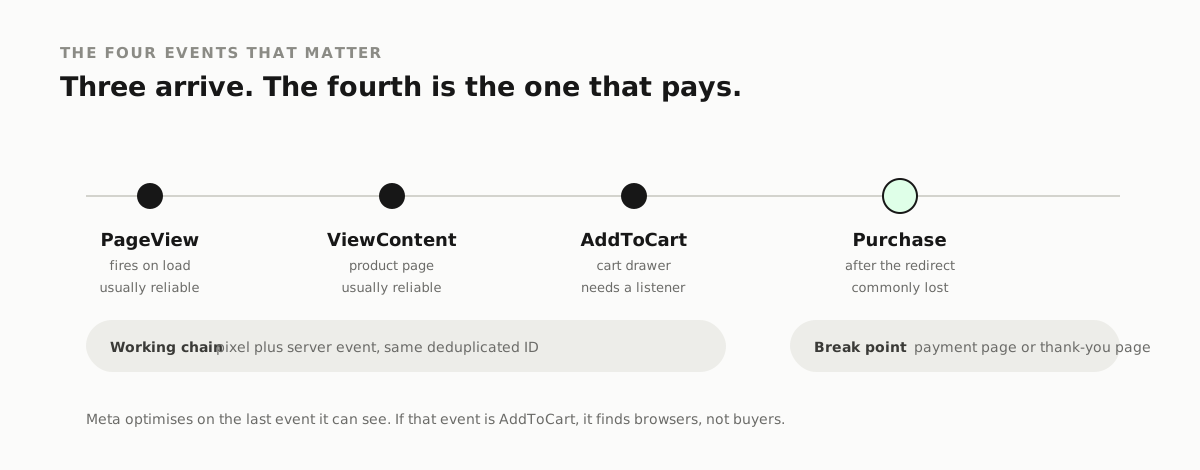
1. Look at the raw event, not the report
Open Events Manager, then Test Events, then load your own site in the same browser. You are looking for the event firing live, with a timestamp.
If Test Events shows nothing, the browser is not sending. That is a code or consent problem, and nothing further down this list matters until it is fixed.
If Test Events shows the event, the pixel works. The problem is what happens after: matching, attribution or reporting. That is a different job.
2. Consent is blocking the first send
A cookie banner that fires after the pixel has already run will block the browser event on a first visit. The visitor who says yes on their second page view gets counted late, or not at all.
Load the site in a private window with a fresh profile. If the pixel only appears after you accept, and a large share of visitors never accept, your reported purchases will always sit under the real number.
3. The purchase is on a different domain
Checkout pages on a separate subdomain, or a payment provider that returns the buyer to a thank-you page the pixel is not installed on, will lose the purchase every time. The chain looks fine until the step that matters.
Fire the purchase event on the page the buyer actually lands on after payment, even if that page belongs to a provider you do not control.
4. Browser and server events are double counting
Modern setups send the same purchase twice: once from the browser, once from the server through the Conversions API. Meta removes the duplicate only when both carry the same `event_id` and the same event name. Without that ID you get inflated totals and unstable optimisation.
Open the event in Events Manager and check for a deduplication status line. Missing it? That is the bug.
5. Server events are missing customer details
A server event tells Meta something happened. Without hashed email or phone, it cannot match that event to a person. The result is a purchase that exists in the raw event log and never shows up in the campaigns it came from.
Advanced matching is not optional on a server-only setup. It is the whole reason the server event is worth sending.
6. The eight-event limit
On Apple devices with tracking restrictions, a domain can only register eight events, ranked by priority. If your purchase event sits below an event you never use, it gets dropped for that traffic.
Open Aggregated Event Measurement in Events Manager and read the order. Purchase belongs at the top. Page view does not belong in the list at all.
7. You are reading a date range that hides the problem
Attribution windows and reported time zones are set per ad account, and they do not match your shop's dashboard by default. A purchase at 11pm local can land on the next day in Meta's report.
Compare a single day, then the same day, using the same time zone on both sides. If the gap closes, you never had a tracking problem, you had a spreadsheet problem.
How to tell whether the gap is real
Before you fix anything, size the problem. Take one week, and put three numbers side by side: purchases in your shop's own orders report, purchases in Meta, and purchases in GA4.
Then read the shape of the difference.
- Meta lower than the shop by a wide margin: the browser event is being lost, so look at consent, the thank-you page and deduplication first.
- Meta higher than the shop: the event is firing on something that is not an order, usually a failed payment page or a test order you placed yourself.
- Both close, GA4 low: GA4 is missing the server event, which is a reporting problem rather than a Meta one.
A gap that stays the same proportion every week is usually a genuine attribution difference. A gap that swings is a technical fault, and it is worth chasing.
What a clean setup looks like
One pixel ID per domain. Browser and server events sharing an `event_id`. Purchase fired on the page the buyer actually lands on. Advanced matching sending hashed email. Purchase at the top of the eight-event list. A dashboard you can reconcile against the shop in under a minute.
That is not an advanced setup. It is the minimum for numbers you can make decisions with.
What reinstalling actually does
It does not fix consent, a missing thank-you page, a deduplication ID or an event priority list. It adds a second pixel, which is genuinely worse: two IDs, half the history each, and an audience that has to rebuild from nothing.
Fix the event. Leave the pixel alone.
When the fix is a rebuild
If checks one to seven are all clean and the counts still do not match your shop, the setup itself is the problem: server container, GA4 reconciliation, or a theme that fires events twice.
That is the work we do on the Tracking and Analytics service page. It starts with a discrepancy audit against your real orders, so the first thing you get is the size of the gap, not another dashboard. If your numbers disagree in the other direction, Meta reporting more sales than your shop actually shipped covers that failure mode too.
Searches this answers
- meta pixel not working
- facebook pixel not tracking purchases
- meta pixel not firing
- conversions api deduplication
- aggregated event measurement 8 events
- meta event manager test events
THE SERVICE BEHIND THIS POST
Tracking & Analytics
We fix your Meta Pixel, Conversions API (CAPI), GA4 and Server GTM so your ad platform matches your real store or CRM orders.See how Tracking & Analytics worksNEED THIS APPLIED TO YOUR OWN ADS?
Get a free ad audit