

Two numbers, two questions
Shopify answers one question: how many orders came in.
Meta answers a different one: how many orders can I claim some credit for, inside a time window.
Both are honest. They will never match. Once you accept that, the job stops being "fix the pixel" and becomes "find the size of the gap and decide whether it is explainable".
Reason one: the attribution window
The default is 7-day click and 1-day view. Open the campaign on a Tuesday and you are counting purchases from people who clicked in the last seven days, plus anyone who only saw the ad in the last day.
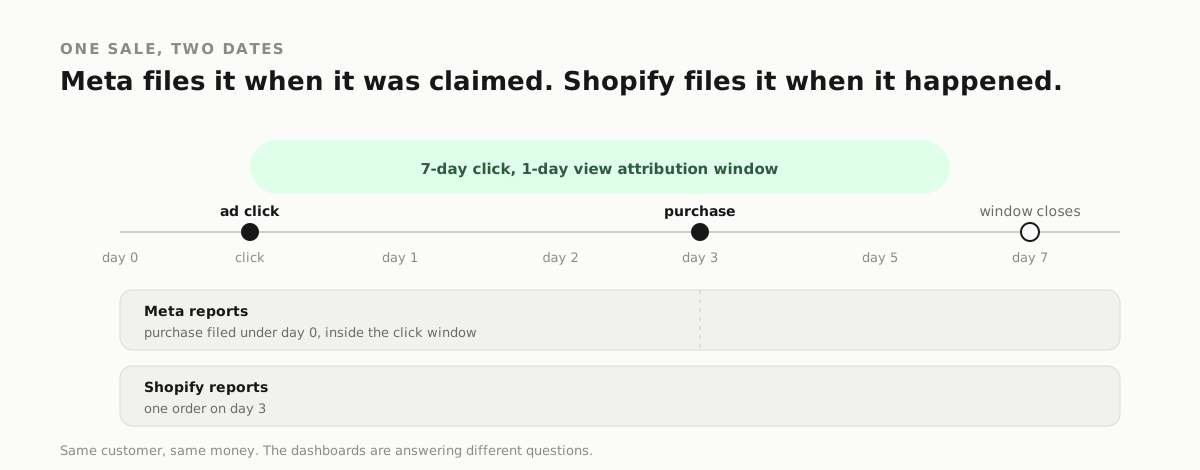
Shopify counts the order when it happens. Meta counts it when the window closes, and files it under the ad that touched the person.
A customer who clicked on Monday and bought on Friday lands in Monday's Meta report. In Shopify it is a Friday order. One sale, two dates.
Switch the window to 1-day click in Ads Manager and watch the gap shrink. That is not a fix. It is proof the window explains most of it.
Reason two: duplicate events
Pixel and Conversions API both fire the purchase. If they do not share an event ID, Meta sees two purchases.
This is the gap that is actually a bug. It inflates the number, it trains the system on fake volume, and it makes cost per purchase look better than it is.
Open Events Manager, choose the purchase event, and read the deduplication column. You want one row showing browser and server events merged. Two separate purchase events means duplicates.
Reason three: modelled conversions
Some events never arrive. iOS opt-outs, ad blockers, consent choices. Meta fills part of the gap with modelled conversions. Those are estimates sitting in the same column as real purchases.
Shopify has no reason to model anything. It saw the order.
This is the part of the gap you cannot remove. You can only decide whether its size makes sense for your traffic mix.
The one-hour reconciliation
- Pick a full week, not a single day.
- In Shopify, count orders from new customers only.
- In Meta, set the window to 7-day click and 1-day view, then read purchases for the same week.
- Divide the difference by the Shopify number.
- Under 20%: normal. Over 50%: check deduplication.
- Double: something fires twice, or the order event fires on page load.
Write the number down. Run it every month. A tracking problem is easy to spot when you have a baseline, and invisible when you do not.
What to fix, in order
- Deduplicate purchase events with a shared event ID.
- Fire the purchase on the order confirmation page, not a redirect that can load twice.
- Send value and currency on every event. Without value, ROAS is a guess.
- Keep one attribution window in reporting, month to month.
- Stop comparing Meta's purchases to Shopify's total revenue. Compare like with like.
When the gap is legitimately large
A 2x gap is not always a bug. Three situations produce it honestly.
- Long consideration. A 30-day sales cycle means many purchases sit outside a 7-day window. Meta only reports what falls inside it, yet views and clicks keep influencing the sale.
- Heavy view-through traffic. If your creative runs in placements people see but rarely click, view-attributed orders can be a large share.
- A second channel. Someone sees a Meta ad, then searches your brand and buys through Google. Meta claims the view, Google claims the click, you get one order.
None of these is a reason to stop watching the gap. They are reasons to compare new-customer orders, not total revenue, and to keep the window consistent so the comparison means something.
What to send your developer
Tracking fixes fail when the request is vague. Give them this:
- The event name (Purchase, Lead, AddToCart).
- The platform ID and the pixel ID.
- The event ID source. It has to be the same value in the browser and on the server, usually the order ID.
- The page the event fires on, and whether that page can reload.
- The currency and value fields.
- A test order to confirm one event arrives, not two.
That list turns a two-week mystery into an afternoon.
The three numbers to compare monthly
- Meta purchases. Same window every month, 7-day click, 1-day view.
- Shopify new-customer orders. Not total revenue, not returning buyers.
- Blended cost per new customer. Total ad spend divided by new-customer orders.
Write all three down. When the first two drift apart, you know to look at tracking. When the third rises while the first two hold, you know it is a creative or offer problem. That is the entire value of reconciliation: it tells you which problem you actually have.
What good tracking looks like
You stop asking why the numbers differ and start knowing the size of the normal gap. When it doubles you know within a day. When it halves you know something started working.
That is the point of tracking. Not a perfect number. A stable one.
Searches this answers
- meta ads more conversions than shopify
- facebook pixel duplicate purchase events
- conversions api deduplication event id
- meta attribution window explained
- facebook ads manager numbers different
- meta ads vs shopify sales
NEED THIS APPLIED TO YOUR OWN ADS?
Get a free ad audit