

The four sizes that cover everything
- 1:1, 1080 x 1080. Feed and carousel. The safest default.
- 4:5, 1080 x 1350. Takes more vertical space in feed. Better for products and before and after.
- 9:16, 1080 x 1920. Stories and Reels. Full screen, no crop.
- 1.91:1, 1200 x 628. Link ads and the wider placements Advantage+ will use.
Design at 1080px wide and export from there. Smaller files look sharp and load faster. A 4000px export is a slower page, not a better ad.
Safe zones on 9:16
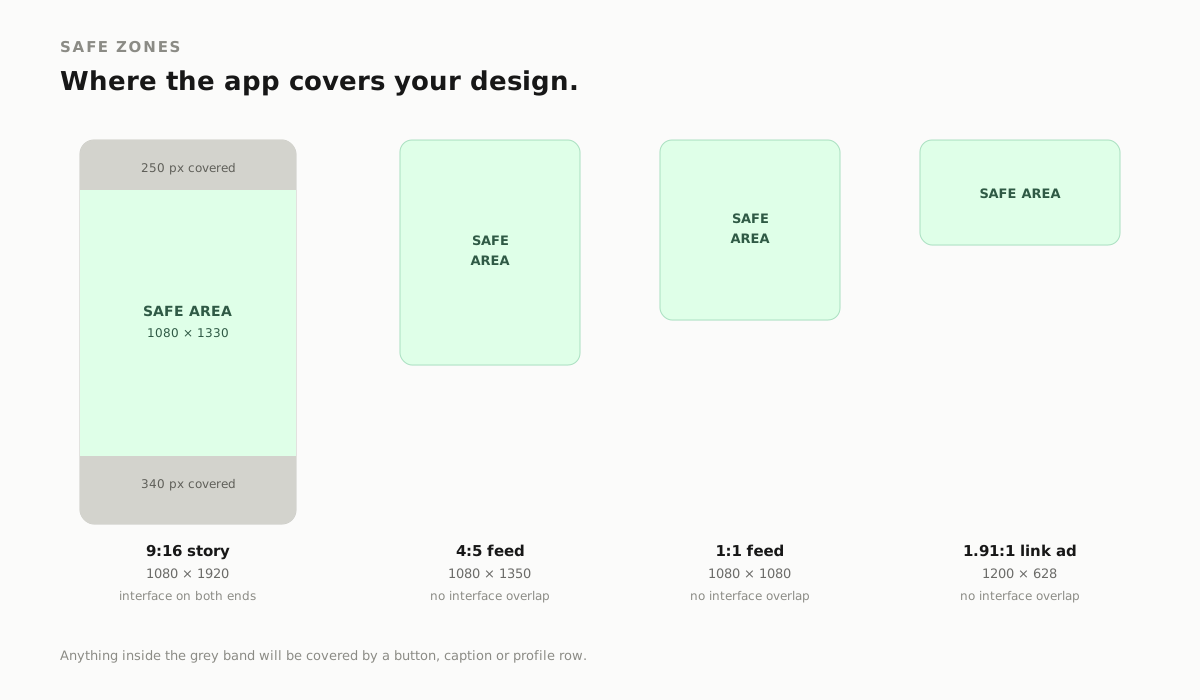
Stories and Reels draw interface over the frame. The account name sits at the top. The caption, buttons and progress bar sit at the bottom.
Keep the headline and the logo out of the top 14% and the bottom 20% of the frame. On a 1080 x 1920 canvas that is roughly the top 250 pixels and the bottom 340 pixels.
The middle 1330 pixels is your actual canvas. Put the offer there.
The 400-pixel test
Most people see the ad on a phone, in a feed, at roughly a third of the size you designed it.
So resize the export to 400 pixels wide and look at it. Not on a laptop at full size. At 400px, next to other ads.
If the headline needs squinting, it is too small. If the product is a smudge, the crop is wrong. If the offer is unreadable, the offer is not there.
One habit, more bad creative caught than any design principle.
Contrast, not decoration
Text over a photo needs help. Two options that work.
- A solid plate behind the text at 30% to 60% opacity.
- A gradient scrim that runs from the text edge into the image.
Body text needs about a 4.5:1 contrast ratio against what is behind it. Large headline text can go lower, around 3:1. When in doubt, darken the plate.
Grey text on a mid-tone photo is the most common failure we see. It looks fine on a calibrated monitor and disappears on a phone at 60% brightness.
One idea per image
A feed ad gets about one second. That is enough for one idea.
- One headline, eight words or fewer.
- One call to action.
- One price or offer, if there is one.
- One subject. A product or a person, not both competing.
If the ad needs a paragraph to make sense, that paragraph belongs in the primary text, not on the image.
Price is a shape
"249 per month" as a small line in the corner gets skipped. As a solid block with a large number, it gets read.
Treat price, discount and guarantee as design elements with their own weight and position. They are the reason most people stop scrolling.
File hygiene
- WebP or high-quality JPG, sRGB colour.
- Under 500KB where possible. Under 200KB is better.
- No tiny legal text. If a disclaimer cannot be read at 400px, shorten it or move it to the landing page.
- Export at the exact ratio you upload. Cropping inside the ad manager is how headlines get cut in half.
Do not stretch
When a creative has to fill a new placement, crop it. Never scale one axis. A stretched face reads as broken, and people notice that before they read a word.
Build the 1:1 and the 9:16 as two compositions, not one image squeezed into two frames.
Text baked into the image
Meta reads text inside an image far less reliably than text in the headline field. It also cannot be translated, cannot adapt to a placement, and cannot be edited without a new export.
Use the image for the number, the shape and the face. Use the ad fields for the sentence.
A useful split:
- Image: price, offer, product, face, one short headline.
- Primary text: the argument, the objection handling, the details.
- Headline field: the action, short enough that nothing truncates.
When the image does the whole job, every placement becomes a compromise.
Cropping 1:1 to 9:16 without breaking it
You cannot centre-crop a square into a vertical frame and keep the layout. Something has to move.
Rebuild it in three layers:
- Background. Extend the backdrop, do not stretch the photo.
- Subject. Reposition so the face or product sits in the middle 1330 pixels.
- Text. Re-type at the new width. Never scale the type up and call it a redesign.
Ten minutes per frame, and the story ad stops looking like a cropped feed ad.
What we check on a batch before it ships
- Every ratio exported at the exact pixel size.
- The headline read at 400px on a phone, not on a monitor.
- All copy tested in both light and dark feed contexts. A white logo over a pale photo disappears in one of them.
- The same offer spelled identically across every variant. Price mismatches between the ad and the page are the fastest way to lose a sale.
- File names and alt text written for humans, because they are read by search engines and screen readers, not just by you.
A batch of six creatives takes about an hour to check this way. It saves a week of confusing performance data.
The five-minute checklist
- Shrink it to 400px. Still readable?
- Is the headline under eight words?
- Is the price a shape, not a sentence?
- Is all text out of the 9:16 safe zones?
- Is the file under 500KB?
- Does the first frame match the landing page?
Six questions. Most weak ads fail at least two.
Searches this answers
- facebook ad image sizes
- instagram story ad safe zone
- meta ads creative specs
- facebook ad size 1080x1080
- story ad dimensions
- ad creative contrast ratio
- facebook ad text limit
NEED THIS APPLIED TO YOUR OWN ADS?
Get a free ad audit